PgDog vs. RDS Proxy
PgDog is a proxy for scaling PostgreSQL. It’s one among many, so we’re starting this series of posts to compare us with the competition.
On today’s menu is RDS Proxy, a managed connection pooler created by AWS RDS. It works out of the box, can be deployed with a click of a button, and is maintained by the largest tech company in the world.
So, why replace it with our humble open source project?
TLDR: PgDog doesn’t pin connections, has predictable autoscaling behavior, and is 2x faster than RDS Proxy.
Connection pinning
Connection pinning automatically disables transaction pooling for app connections if they use session-level Postgres primitives.
For example, when your app executes a SET statement, its connection will be “pinned” (or locked) to whichever Postgres connection executed that statement:
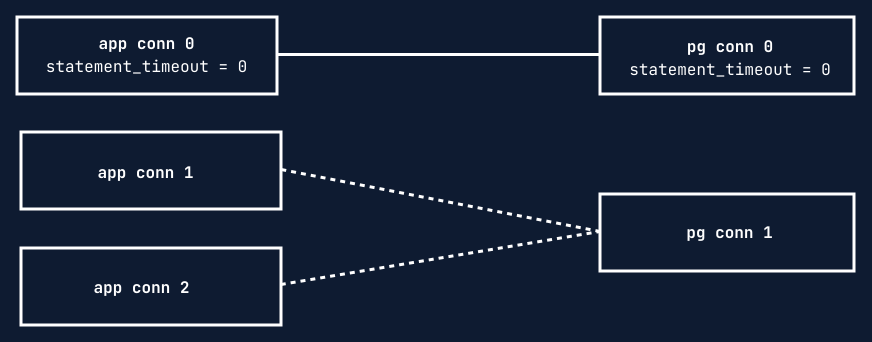
Other app connections can’t share the same Postgres connection anymore until the pinned connection is closed by the application.
This is by design. It allows your application to use all Postgres features without the proxy breaking its queries. Specifically, pinning is triggered by using SET statements, temporary tables, advisory locks, and by executing long queries.
So, why is this a problem?
Transaction mode at scale
Transaction mode works by multiplexing thousands of app connections with just a handful of Postgres connections. It’s necessary for busy production applications.
If it’s disabled, the proxy has to open more Postgres connections for each client it pins. Eventually, the database runs out of available connections and breaks.
In the extreme case where most connections are pinned, pooling connections becomes ineffective: you might as well not use a Postgres proxy at all.
To avoid this, you have to rewrite your queries or manually detect pinned connections and close them. This causes unnecessary connection churn and adds latency to the app.
With PgDog, this doesn’t happen. It handles SET automatically by “transplanting” the session state between Postgres connections. This is fast and, just like RDS Proxy, works out of the box.
Query length limit
If your query is longer than 16 KB, RDS Proxy will pin the connection.
I’m not sure why this feature exists. I suspect that’s because RDS Proxy parses queries to detect SET statements and gives up if the query is too long to avoid adding latency to the request.
PgDog doesn’t do this. It comes with a built-in PostgreSQL parser, which can handle queries up to 1 GB in length1.
If your queries are long, make sure to give PgDog enough memory, e.g., by setting the resource allocation in our Helm chart:
# values.yaml
resources:
  requests:
    memory: 4Gi
Our query parser operates at native speed: if Postgres can parse the query, PgDog can as well.
If you’re still concerned about parsing overhead, we added a couple of shortcuts in the hot path to quickly detect common statements, like SET. This keeps the overhead to a minimum, and you don’t need to change your app.
Autoscaling
The default configuration for PgDog doesn’t support autoscaling. This is intentional. PgDog is multithreaded and is built to run on large, multi-CPU machines.
Multithreading allows it to serve thousands of clients while sharing just one connection pool. This maximizes connection pool efficiency: fewer Postgres connections can serve the same number of clients.
If you’re using our Helm chart, the number of threads is easily configurable, for example:
# values.yaml
workers: 16
resources:
  requests:
    cpu: 16
Before deploying, double-check that the number of workers matches the number of whole CPU units to avoid being throttled by Kubernetes, and you’re good to go.
Serverless uses servers
RDS Proxy is “serverless”: it automatically creates more machines in response to increased application traffic and removes them when they are no longer needed.
While this is an attractive property for most systems, it’s actually a problem for Postgres connection pooling.
Each new instance of the proxy maintains its own connection pool. That pool cannot be shared between clients connecting to different instances:
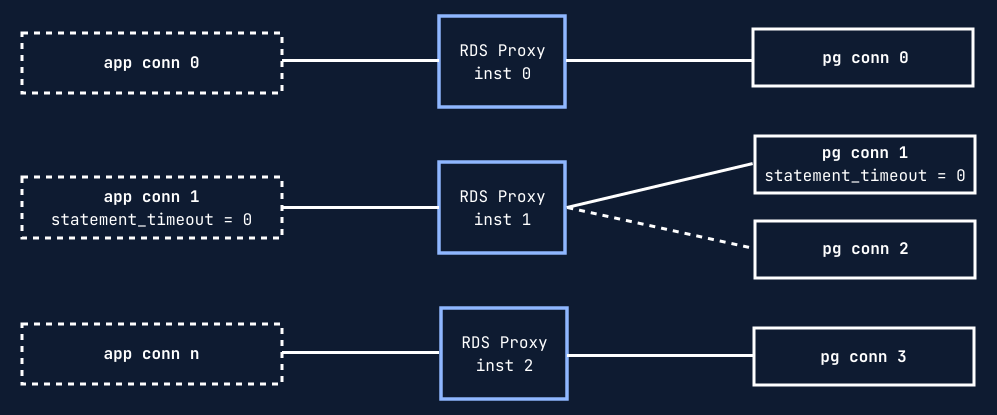
This makes RDS Proxy create more Postgres connections than PgDog to serve the same number of queries. More connections means additional context switching on the database CPU, which reduces throughput and increases latency.
High availability
Despite preferring large machines, a PgDog deployment can also have multiple instances, and because it’s config-driven, the instances don’t need to talk to each other.
This architecture makes it resilient to hardware failure. Typical PgDog deployments have no trouble achieving 99.99% uptime, just by using our Helm chart:
# values.yaml
replicas: 3
multiAz:
  enabled: true
The chart automatically configures anti-affinity rules which deploy pods across availability zones and different nodes in the same zone.
Performance
In every benchmark we ran, PgDog outperformed RDS Proxy by a factor of two on average:
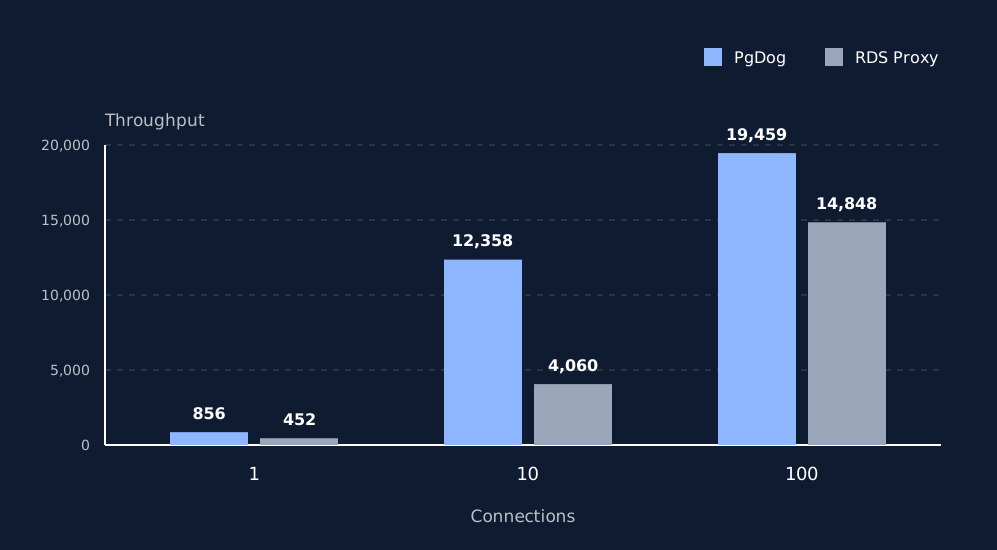
We used pgbench and had it run a simple SELECT 1 query. This ensured that Postgres performance was not a factor and that we were testing only the proxies’ performance.
PgDog was deployed on another EC2 machine with 4 CPUs, while RDS Proxy was deployed in AWS RDS.
Benchmarks are fine as a sniff test, but we are also starting to see use cases from our open source users and customers that show PgDog is faster than RDS Proxy with production workloads.
You shouldn’t take our word for it. PgDog is free and open source, so you can run your own tests. We will have some customer case studies published soon, too.
Deploying PgDog
Deploying PgDog isn’t as easy as an AWS product. Until we build a managed cloud, you have to deploy it yourself. We do provide a couple, relatively easy, ways to do so:
- Our Helm chart
- AWS ECS Terraform module (experimental)
The Helm chart is production-grade and widely used. If you’re running Kubernetes already, you should be able to deploy it pretty easily.
If not, our Terraform module is starting to see some usage and contributions, so please try it and let us know how it goes.
Closing thoughts
Building PgDog is our full time job. We are four engineers who only care about one problem: making Postgres work at scale.
If you’re thinking about deploying PgDog, let us know. We offer commercial support with SLAs up to P0.
-
https://dba.stackexchange.com/a/131425 (yup, that website still exists). ↩